

Digital Business / Search reporting / Setup guide
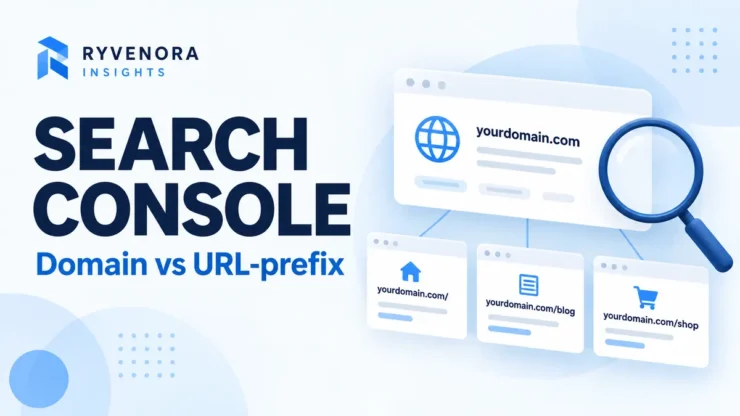
Choose a Search Console Domain property for a broad view of a domain across protocols and subdomains. Use a URL-prefix property when you need a specific HTTPS host or website section, or a verification method that does not require DNS access. Many businesses benefit from keeping both, with a clear purpose for each.
The decision is about what you can measure and manage. It does not select your preferred website address, redirect visitors, or guarantee indexing. Start with your reporting question and the access you control, then choose the property that matches.
For a business that controls its domain DNS, evaluate a Domain property as the main overview. Add a focused URL-prefix property only when it solves a concrete reporting, access or integration need. Keep a short record of what each property is for.
01 / Compare what each property includes
Google’s property documentation defines a Domain property using a domain name without a protocol or path, such as example.com. Its coverage includes subdomains, protocols and paths beneath that domain. A URL-prefix property includes URLs beginning with the specified prefix, including the protocol.
That makes https://www.example.com/ a different scope from https://example.com/. A prefix such as https://www.example.com/blog/ is narrower again. Include the actual host and path you intend to analyse rather than assuming Search Console will substitute the version you meant.
Google’s 2019 announcement of Domain properties explains the motivation: a combined view avoids manually assembling protocol and subdomain variations. That remains a useful reason to choose broad coverage, even when your everyday website uses one preferred address.
Before adding anything, ask the existing site owner whether a suitable property already exists. You may need access to the current setup rather than another item in the selector. Name your internal reporting document clearly, even if the property label itself is determined by its domain or prefix.
02 / Work through a coverage example
Consider a hypothetical business with a public website, a shop subdomain and a blog section. The table applies the documented scope rules; it is not a report from a real business.
| URL | Domain: example.com | Prefix: https://www.example.com/ | Prefix: https://www.example.com/blog/ |
|---|---|---|---|
| https://www.example.com/about/ | Included | Included | Outside scope |
| https://www.example.com/blog/planning/ | Included | Included | Included |
| https://shop.example.com/products/ | Included | Outside scope | Outside scope |
| http://www.example.com/about/ | Included | Outside scope | Outside scope |
Use a similar table for your own site before configuration. Write down the URLs your team actually cares about: a homepage, a service page, a language section and any separate shop or help centre. Mark the property that should contain each one.
A broader view helps answer “what is happening across the domain?” A focused view helps keep a section-specific discussion on task. Neither view is automatically the right denominator for every report. Agree on the reporting boundary before comparing work from different teams.
03 / Choose a verification route you can maintain
Domain properties require DNS verification. URL-prefix properties offer several methods, subject to the requirements Google shows for your site. Google’s ownership-verification guide covers DNS, HTML files, HTML tags and eligible Analytics or Tag Manager setups.
For a Domain property, follow the wizard’s supplied record type, name and value. TXT is common; Google also documents CNAME verification for applicable configurations. Do not treat a generic token from an article as your own verification credential.
- Confirm who manages the domain’s active DNS zone.
- Copy the property-specific values from Search Console.
- Follow that provider’s field conventions and preserve existing records.
- Check that the requested record is being served, then return to Verify.
- Save the verification method and responsible account in your handover notes.
If DNS access is unavailable, ask an existing owner to grant access or evaluate a URL-prefix method supported by your platform. An Analytics or Tag Manager method has its own permission and implementation requirements; merely using those products does not establish eligibility.
A request to add a verification record is not a request to replace nameservers, move hosting or change mail delivery. Send the DNS administrator the exact requested addition and its purpose so the work stays narrow.
Google defines a verification token as evidence linking a particular user to ownership of a property. Treat its continued presence as part of the account’s access setup, and document it before changing themes, DNS services or tracking tags.
04 / Keep business ownership separate from agency work
Google’s permissions guide distinguishes owners, full users and restricted users. Owners manage access and settings; full users can view all data and take some actions; restricted users have more limited viewing rights. Choose the role from the work required.
A business should keep a verified owner account it controls. Invite the agency or consultant using their Google Account rather than handing over the owner’s password. Ask which reports and actions they need, and record the property, role, purpose and review date.
An owner can add a person through Settings → Users and permissions. Before saving, verify the email address and property scope. For section-only work, consider whether a focused property supplies the needed access, and check existing parent-property ownership rather than assuming a narrower property removes broader rights.
During offboarding, review both the user list and verification tokens. Google warns that an owner whose token remains may be able to verify again, and that removing a token can affect other services using it. Identify dependencies before deletion.
If the same agency also manages a local business listing, review that access separately. Our Google Business Profile owner vs manager guide covers that separate service; a role there does not describe Search Console permissions.
05 / Inspect the right URL before diagnosing indexing
Google’s URL Inspection documentation says the fully qualified URL must belong to the currently selected property. If inspection rejects a URL as outside the property, check the selected scope before changing the website.
Copy the exact address you want to investigate. Check its protocol, host and path against your coverage table. If a page redirects, note both the starting address and destination so the investigation remains clear.
The initial inspection result describes Google’s indexed information; it is not automatically a live test. Use the live test when you need to check current accessibility or a recent fix. A successful test and an indexing request do not guarantee that a page will appear in Search.
Property choice also does not set the canonical URL. Google’s canonicalization guidance describes signals such as redirects, canonical annotations and sitemap inclusion. Investigate those website signals when the selected canonical is unexpected, rather than adding properties to try to force the choice.
06 / Make reports comparable before interpreting changes
The Search results Performance report offers clicks, impressions, CTR and average position, with dimensions and filters. Record the property, date range, search type and filters beside every recurring export.
For a practical reporting routine, define one business question per view. For example, use the broad property for an overview and a focused page selection for an editorial review. Explain why the scope differs instead of presenting the totals as competing measurements of the same thing.
| Before comparing | Record | Reason |
|---|---|---|
| Property | Exact Domain or URL-prefix scope. | A different boundary can include different pages. |
| Time and search type | Date range and selected search view. | Keep the comparison consistent. |
| Filters | Page, query, country and device selections. | Make a narrow analysis reproducible. |
| Export notes | Purpose, extraction date and known limitations. | Help the next reader interpret the figures. |
Google notes that chart and table totals can differ because of aggregation, and the newest data can be preliminary. Do not treat every discrepancy as missing tracking or a broken verification method.
For US, UK, Canadian or Australian market reviews, use the relevant country selection consistently and label it in your report. Keep a domain-wide view for context if international visibility matters. Country filtering is an analysis choice, not evidence that the site serves only that country.
07 / Review setup when the website or team changes
Create a short property register rather than relying on memory. Include the exact scope, business purpose, owner account, verification method, DNS or website contact, users and report destination. Store access details through your normal account-management process.
- Confirm that important sample URLs fit the intended property.
- Check that the business can maintain verification without an outgoing supplier.
- Ask each invited person to confirm access to the required view.
- Keep recurring report settings documented.
- Review access after agency changes, staff departures and site migrations.
After adding a property, allow time for reporting to populate before deciding it is broken. Google’s setup documentation says data normally begins appearing after a few days. If the view remains empty, first recheck the scope and whether the site has Search activity rather than repeatedly deleting and recreating it.
When a site changes from one host or section structure to another, revisit your sample-URL table and reports. Preserve useful existing views while you decide what the new setup needs. Make configuration changes for an explicit reason and record the resulting scope.
Frequently asked questions
Can I keep both property types?
Yes. Give each a purpose so people know which view to use and do not compare different scopes accidentally.
Will a Domain property improve rankings?
Adding a property provides access to reporting and tools. It does not itself improve rankings or guarantee indexing.
Should an agency become the only verified owner?
Keep business-controlled ownership and grant the agency the access its work requires. Plan the handover before the engagement ends.
Is www included in an HTTPS URL-prefix property without www?
No. Treat the exact host as part of the prefix and check your coverage examples before choosing the view.
Sources and editorial notes
Google’s primary documentation was checked on 28 October 2026. Coverage examples are hypothetical. This guide describes a planning and verification workflow; it does not report a performed account setup, ranking improvement or hands-on test.


Add comment